


Stock Rocket™ AutoHero 10-in-1
Stock Rocket™ AutoHero 10-in-1
📱 Wireless via Bluetooth & Wi-Fi
🖨️ Ink-free — no cartridges ever
📄 Full A4 professional printing
🔋 Rechargeable built-in battery
💼 Ultra slim & travel-ready
💻 Works with iOS, Android, Windows & Mac
Couldn't load pickup availability
Stock Rocket™ AutoHero 10-in-1
Get it between - and -.
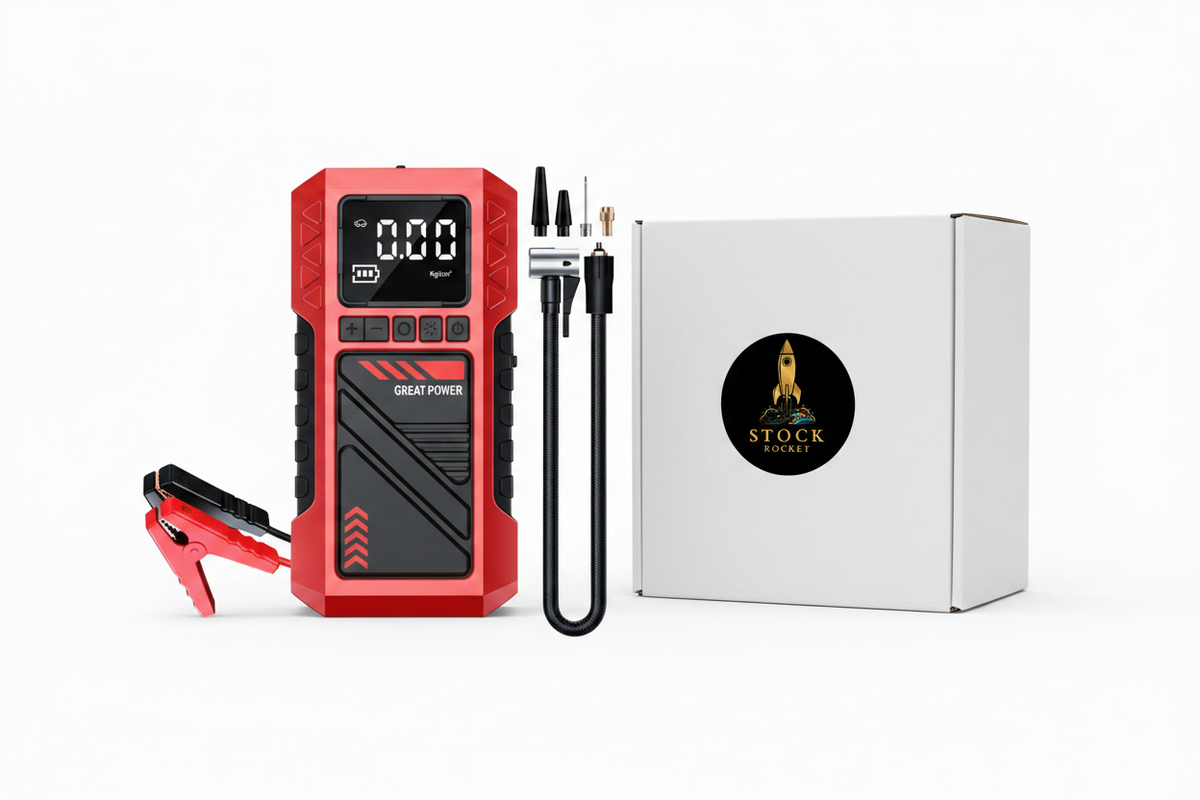
AutoHero 10-in-1 Portable Emergency Car Kit
Powerful Jump Starter • Tire Inflator • Power Bank • Emergency Flashlight
🚗 Be Ready for Any Roadside Emergency
The AutoHero 10-in-1 is the ultimate all-in-one emergency companion for every driver. Whether you're dealing with a dead battery, low tire pressure, or need emergency lighting, this compact device has everything you need in one portable unit.
⭐ Key Features
- ✔ 8000A Heavy-Duty Jump Starter – Instantly start most 12V gasoline and diesel vehicles.
- ✔ 180 PSI Air Compressor – Inflate car tires, motorcycle tires, bicycles, sports balls, and more.
- ✔ 8000mAh Rechargeable Battery – Reliable emergency power whenever you need it.
- ✔ Digital LCD Display – Easily monitor battery level and tire pressure.
- ✔ Built-in LED Flashlight – Bright emergency light for roadside assistance and nighttime use.
- ✔ Multiple Inflation Nozzles Included – Suitable for a wide variety of inflatables.
- ✔ Portable & Lightweight – Easy to store in your vehicle without taking up much space.
- ✔ Durable Construction – Designed for reliable performance in demanding conditions.
🔧 10-in-1 Functions
| Function | Description |
|---|---|
| Car Jump Starter | Starts vehicles with dead batteries. |
| Air Compressor | Up to 180 PSI tire inflation. |
| Digital Pressure Display | Monitor inflation accurately. |
| Power Bank | Recharge phones and USB devices. |
| LED Flashlight | Emergency illumination. |
| Portable Design | Easy to carry and store. |
| Safety Protection | Designed with multiple safety protections. |
| Multiple Air Nozzles | For tires, balls, bicycles, and inflatables. |
| Rechargeable Battery | 8000mAh built-in battery. |
| Emergency Roadside Tool | Perfect for travel, commuting, and emergencies. |
📦 What's Included
- ✔ AutoHero 10-in-1 Portable Air Compressor & Jump Starter
- ✔ Smart Jumper Cables
- ✔ Air Hose
- ✔ Inflation Nozzle Set
- ✔ USB Charging Cable
- ✔ User Manual
🎯 Perfect For
- Cars
- SUVs
- Pickup Trucks
- Motorcycles
- Bicycles
- Road Trips
- Camping
- Emergency Preparedness
Why Choose AutoHero?
Instead of carrying separate tools for jump starting, tire inflation, charging devices, and emergency lighting, the AutoHero combines them into one powerful and compact solution. Save space, stay prepared, and drive with confidence wherever the road takes you.
Drive With Confidence.
Keep the AutoHero 10-in-1 in your vehicle and be prepared for unexpected roadside emergencies anytime.


HPRT FlexPrint™ FAQs
What makes the HPRT FlexPrint™ ink-free?
The FlexPrint™ uses advanced thermal printing technology — it applies heat directly to specially coated thermal paper to create text and images, eliminating the need for ink cartridges or toner completely. This means zero ongoing ink costs.
What devices is it compatible with?
The HPRT FlexPrint™ works seamlessly with iOS, Android, Windows, and macOS devices. Connect via Bluetooth or Wi-Fi from your smartphone, tablet, laptop, or desktop — no drivers or cables needed.
How do I connect via Bluetooth or Wi-Fi?
For Bluetooth, simply enable Bluetooth on your device and pair with the FlexPrint™. For Wi-Fi, connect both your device and the printer to the same network. Download the HPRT app for the easiest setup experience.
What paper does it use and where do I load it?
The FlexPrint™ uses standard A4 thermal paper. Open the paper tray at the back of the device, load the paper with the thermal-coated side facing the correct direction, and close the tray — it's ready to print.
How long does the battery last?
The built-in rechargeable battery is designed for all-day use, allowing you to print continuously on the go without needing a power outlet. Charge it via the included cable when needed.
What is the warranty and support policy?
The HPRT FlexPrint™ is backed by our Stock Rocket satisfaction guarantee. If you experience any issues with your device, contact our support team and we'll resolve it promptly.
Print Wherever Work Takes You
Meet the HPRT FlexPrint — a portable wireless A4 thermal printer that keeps professionals, students and travellers ready to print without ink, cables or a fixed desk.
The FlexPrint Difference
10%
seconds or less to print many everyday A4 documents, so you can keep moving between meetings, classes and job sites.
0%
ink cartridges or toner to buy, refill or carry — thermal printing keeps everyday running costs simple.
100%
wireless convenience across iOS, Android, Windows and macOS with Bluetooth and Wi-Fi connectivity.
Practical, ink-free printing designed for remote work, field jobs, study and life on the move.
WELCOME TO STOCK ROCKET!
NEW PRODUCTS ON THE WAY!
ENJOY YOU'RE BROWSING!
SEEING SOMETHING YOU LIKE?
ORDER NOW WHILE ITS STILL AVAILABLE!
WELCOME TO STOCK ROCKET!
NEW PRODUCTS ON THE WAY!
ENJOY YOU'RE BROWSING!
SEEING SOMETHING YOU LIKE?
ORDER NOW WHILE ITS STILL AVAILABLE!
WELCOME TO STOCK ROCKET!
NEW PRODUCTS ON THE WAY!
ENJOY YOU'RE BROWSING!
SEEING SOMETHING YOU LIKE?
ORDER NOW WHILE ITS STILL AVAILABLE!
WELCOME TO STOCK ROCKET!
NEW PRODUCTS ON THE WAY!
ENJOY YOU'RE BROWSING!
SEEING SOMETHING YOU LIKE?
ORDER NOW WHILE ITS STILL AVAILABLE!
WELCOME TO STOCK ROCKET!
NEW PRODUCTS ON THE WAY!
ENJOY YOU'RE BROWSING!
SEEING SOMETHING YOU LIKE?
ORDER NOW WHILE ITS STILL AVAILABLE!
WELCOME TO STOCK ROCKET!
NEW PRODUCTS ON THE WAY!
ENJOY YOU'RE BROWSING!
SEEING SOMETHING YOU LIKE?
ORDER NOW WHILE ITS STILL AVAILABLE!
WELCOME TO STOCK ROCKET!
NEW PRODUCTS ON THE WAY!
ENJOY YOU'RE BROWSING!
SEEING SOMETHING YOU LIKE?
ORDER NOW WHILE ITS STILL AVAILABLE!
WELCOME TO STOCK ROCKET!
NEW PRODUCTS ON THE WAY!
ENJOY YOU'RE BROWSING!
SEEING SOMETHING YOU LIKE?
ORDER NOW WHILE ITS STILL AVAILABLE!
Why FlexPrint Fits Real Life
From home offices and lecture halls to client sites and long journeys, see how HPRT FlexPrint makes everyday A4 printing simple, wireless and ink-free.
-
★★★★★

A home-office essential
I work between home and client meetings, so I needed something I could set up without a desk full of cables. FlexPrint connects quickly to my phone and prints clean A4 documents whenever I need them. Not having to buy or carry ink is a huge win.
-
★★★★★
Perfect for study sessions
As a student, I mostly print notes, assignments and study guides at the last minute. FlexPrint fits in my bag, works from my iPhone and the battery lasts through a full day on campus. It is much less stressful than searching for a printer before a deadline.
-
★★★★★
Reliable on the road
I visit customers and job sites across the region, and FlexPrint has become part of my field kit. I can print quotes, service forms and delivery documents over Bluetooth or Wi-Fi without hunting for an office. It is compact, rechargeable and dependable when I am working away from the main team.

Why Choose HPRT FlexPrint™?
See how we compare to ordinary printers.
| FlexPrint™ | Others | |
|---|---|---|
Ink-Free Thermal Printing |
||
Wireless Bluetooth & Wi-Fi |
||
Full A4 Output |
HPRT FlexPrint™ FAQs & Help
What makes the HPRT FlexPrint™ ink-free?
The FlexPrint™ uses advanced thermal printing technology — heat is applied directly to specially coated thermal paper to produce text and images, with no ink cartridges or toner required. Zero ongoing ink costs, ever.
What should I do if it won't print?
First ensure the device is charged and powered on. Check that your Bluetooth or Wi-Fi connection is active and the printer is paired correctly. Make sure thermal paper is loaded with the coated side facing the right direction. Restart both the printer and your device if needed.
How do I connect via Bluetooth?
Enable Bluetooth on your smartphone, tablet, or laptop. Power on the FlexPrint™ and it will appear in your device's Bluetooth list. Select it to pair. For the best experience, download the HPRT app from the App Store or Google Play.
How do I connect via Wi-Fi?
Connect the FlexPrint™ and your device to the same Wi-Fi network. Open the HPRT app and select Wi-Fi as your connection method. Follow the in-app instructions to complete setup. Once connected, you can print from any compatible device on the same network.
Which paper should I use and how do I load it?
The FlexPrint™ uses standard A4 thermal paper. Open the rear paper tray, insert the paper with the thermal-coated (slightly shiny) side facing inward, and close the tray firmly. The printer will feed the paper automatically when printing begins.
How can I improve print quality?
Ensure you are using good quality A4 thermal paper. Keep the print head clean by gently wiping it with a dry lint-free cloth. Avoid exposing thermal paper to direct sunlight or heat before printing. Make sure the battery is sufficiently charged for consistent output.